


Flow by ServiceNow launched on October 1, 2026, as a conversational, AI-native service desk that can be running within a day, with no implementation project or infrastructure. ServiceNow calls Flow "a startup within ServiceNow."
According to Flow's Head of Product, Darius Koohmarey, Flow sits entirely outside the ServiceNow platform. He spent twelve years building ITSM and ITOM products on that platform. His reasoning is that the satellite service desks Flow targets need something simpler and lighter by design. For a company whose strength has always been one platform and one data model, that is a deliberate break.
What is Flow by ServiceNow?
Flow is a service desk that works inside conversations. It answers and automates employee requests in Slack, Microsoft Teams, and email, for IT, HR, legal, or any team that fields requests.
Employees don't fill in a form or open a portal. They describe what they need in chat, and Flow resolves it there using the knowledge the organization already has, wherever that knowledge sits, with nothing to migrate. Every exchange is still tracked. Flow records and resolves requests itself, so the team has one place to take requests, answer questions, and close issues.
How Flow works
Setup takes four steps and one admin:
Invite teammates individually, or connect company sign-on to add everyone at once.
Add Flow to Slack or Microsoft Teams. It joins the support channels employees already use, and employees can also message Flow directly.
Connect knowledge, asset, and ticketing sources for context, plus any apps Flow should automate.
Start resolving requests. Flow takes the first pass within limits the admin sets and passes complex or sensitive issues to human agents.
Two design choices stand out in day-to-day use.
It works in shared threads. Flow answers everyone in a thread, even when several people are talking at once.
Channels don't create duplicate records. When a request needs a person, Flow hands it over with full context, and the agent replies in the employee's original thread from the Flow app. An email in the morning and a Slack follow-up in the afternoon stay one conversation, not two tickets.
The AI plays four roles. As Helper, it answers employee questions. As Resolver, it helps agents close requests. As Builder, it creates automations. As Service desk coach, it shows the team how to use Flow better. Admins can tune its behavior by team.
Automations in plain language
Flow is built around one idea: a request the team has solved once shouldn't reach the queue again.
An admin describes the automation in plain language, either from scratch or right after resolving an issue using the "/automate" command, and Flow builds it. Flow drafts the steps, connects the actions, and flags anything missing rather than guessing. Before anything goes live, the team can review and edit each step and run the automation in simulation or a sub-production environment.
Controls are set in advance. Admins decide what each team can read or change and which steps need human approval, and every run is logged.
Flow also suggests what to automate next. Its analytics track request volume, the share of requests resolved through self-service, and resolution time, and flag repeat requests as candidates for automation or new knowledge articles.
Automations built in Flow live in Flow and serve that one team. They run through the Flow bot in Slack or Teams, or through API and MCP.
Integrations and the ServiceNow connection
Flow connects to more than 100 business tools out of the box, ServiceNow included, without moving data or rebuilding processes. Admins control exactly what each team can reach. It connects to the systems that hold identity, knowledge, assets, and tickets, with no knowledge migration and no CMDB required.
For organizations already running ServiceNow, the link works both ways. Flow syncs tickets, assets, knowledge, and Assists with the ServiceNow instance. It brings in knowledge and asset context for the team and syncs work back, so the system of record stays complete.
Flow also takes requests from software, not just people. Other bots and AI assistants can reach Flow through APIs or MCP. Once a request is a conversation that an agent can act on, the party answering it doesn't have to be a person.
Who Flow is built for
Flow fits two kinds of organizations:
Teams inside existing ServiceNow customers that want their own service desk running quickly, such as specific departments, remote teams, and newly acquired business units that need fast deployment or prefer a different operating model.
Organizations new to ServiceNow that want to start with one team, such as IT. They can buy and activate Flow directly, without an existing ServiceNow relationship or platform prerequisite.
Flow isn't limited to IT. CFO Advisors uses it for finance support. The firm runs dedicated Slack channels with clients and uses Flow to answer them in those channels without switching tools. Serenity EHS and VividCharts are small teams that use it to answer internal questions in Slack from what they have already documented.
The public sector is interested too. A deputy at the US Navy's Fleet Numerical Meteorology and Oceanography Center described how Flow could let users build workflows in Microsoft Teams, and called it a practical option for smaller ServiceNow organizations.
Flow vs EmployeeWorks
Both products give employees chat-based help in Slack and Teams, but they solve different problems, and ServiceNow customers can run both.
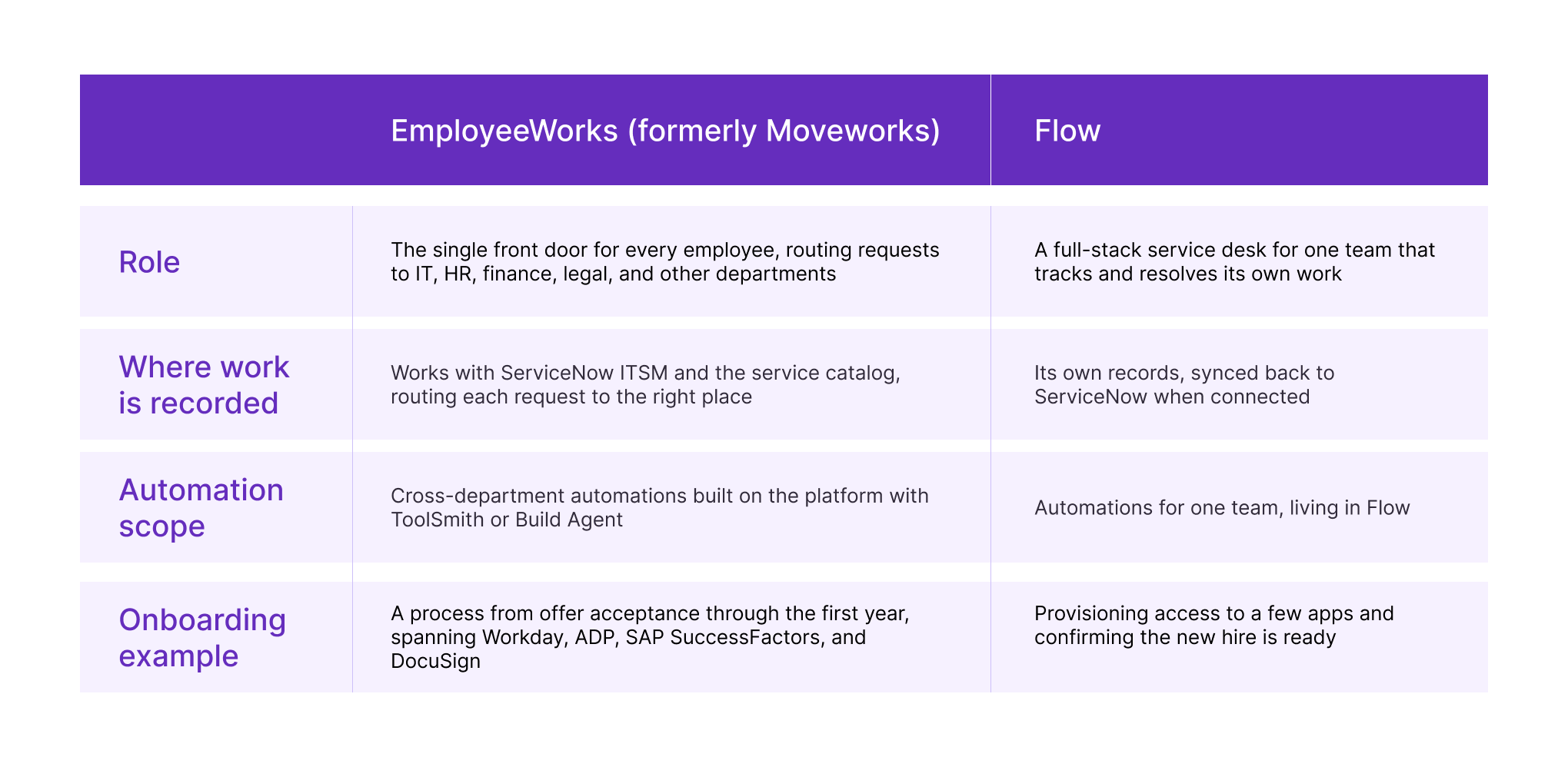
For existing customers, EmployeeWorks stays the front door across chat, Build Agent handles conversational development, and Flow comes in when a satellite team needs its own service desk. Automations built in Flow appear in EmployeeWorks over MCP.
Flow is not a lighter version of ServiceNow ITSM either. Full ITSM is built on the CMDB, ITIL processes, and one shared data model across the enterprise. Flow needs no CMDB, no middleware, and no ITIL alignment. That suits a team that needs structure quickly. An organization that needs enterprise change control or service mapping still needs the platform.
Flow by ServiceNow is not Flow Designer
The name causes confusion in search. Flow Designer is the long-standing workflow builder inside the ServiceNow platform, now part of Workflow Studio, where administrators build flows, subflows, and actions. Flow by ServiceNow is a separate product, with its own website, its own architecture, and its own pricing. If you search for "ServiceNow Flow," check which product a result is about before you rely on it.
Pricing
Flow is priced by usage, which is new for a ServiceNow service desk product.
New customers. After a free 30-day trial with no credit card required, Flow costs $2 per conversation and $1 per automation run. There's a $10K annual commitment that renews automatically each year, with $1K top-ups available, bought in the product with a credit card or through a sales rep.
Existing ServiceNow customers. Flow draws on Assists, the AI usage credits customers already own: 10 Assists per conversation and 5 per automation run. Customers on AI-native SKUs can deploy Flow immediately with no extra procurement, paying through consumption.
The definitions matter for budgeting:
A conversation is one issue, handled by AI or a person, and charged once. Automations that run inside a conversation are free.
An automation run is charged only when it's triggered outside an employee conversation, for example by MCP, API, or another agent.
A quick calculation helps with planning. At $2 per conversation, the $10K minimum covers 5,000 conversations a year, or about 420 a month. A team below that pays for capacity it doesn't use. A team well above it should model expected volume before committing. Existing customers should run the same calculation against their Assist balance, since every Flow conversation draws from the same pool as their other AI features.
Availability
Flow is in controlled availability. Organizations can sign up at letsflow.ai for updates and early access to a free trial, and North American customers get priority access in the first weeks. General availability is expected in North America and EMEA in Q4 2026, when existing ServiceNow customers will be able to use Flow on any pricing plan that includes AI capabilities.
The product is changing quickly. Some of the published demo videos may already show an outdated interface, though the core principles should still hold. At launch, Flow had been tested with about a dozen early access customers.
What to weigh before trying Flow
Lightweight cuts both ways. Not needing a CMDB or ITIL processes is what makes a one-day launch possible. It also means Flow doesn't offer the dependency mapping, change control, or enterprise reporting that full ITSM provides. Flow suits a team with simple, repetitive requests. It's the wrong tool for a team that needs to understand the impact of a change before approving it.
Answers depend on your knowledge. Flow resolves requests from existing knowledge sources. Outdated articles will produce outdated answers, delivered quickly in the same thread where the employee asked.
It's one more system to govern. For ServiceNow customers, Flow is a separate system that syncs with the instance. Before a team adopts it, decide who owns the integration, which records sync, and how Flow's automations relate to those running on the platform.
Costs grow with use. Per-conversation pricing is easy to understand, but it also means a successful rollout costs more as usage grows. That's a reasonable trade-off, as long as it's planned for.
FAQs
What is Flow by ServiceNow?
A standalone conversational AI service desk that answers and automates employee requests in Slack, Microsoft Teams, and email. It launched on October 1, 2026.
Do I need ServiceNow to use Flow?
No. New customers can buy and activate Flow without an existing ServiceNow relationship or platform. Existing customers can connect it to their instance through a two-way sync.
How much does Flow cost?
New customers pay $2 per conversation and $1 per automation run, with a $10K annual minimum after a 30-day free trial. Existing ServiceNow customers use Assists: 10 per conversation and 5 per automation run.
Is Flow the same as Flow Designer?
No. Flow Designer is the workflow builder inside the ServiceNow platform. Flow by ServiceNow is a separate product with its own architecture.
How is Flow different from EmployeeWorks?
EmployeeWorks is the front door for every employee across all departments. Flow is a self-contained service desk for one team that tracks and resolves its own requests.
Does Flow replace ServiceNow ITSM?
No. Flow is built for teams that don't need the CMDB, ITIL processes, or enterprise-wide service management. Organizations running full ITSM can use Flow for specific departments, remote teams, or acquired business units.
When will Flow be generally available?
General availability is expected in North America and EMEA in Q4 2026. Flow is in controlled availability now, with priority access for North American customers.
SYSUSA has worked with ServiceNow customers across the United States for more than a decade, in commercial and federal environments. Flow adds a new option to an already broad portfolio, and the harder question for most organizations is where it fits: next to an existing instance, alongside EmployeeWorks, or as a first step for a team new to ServiceNow. If you're weighing Flow against what you already run, our team can walk you through how the pieces fit together.